Definitive Engineering Takeaway: How to architect a non-locking, encrypted offsite backup pipeline for high-transaction WooCommerce stores. Combining mysqldump --single-transaction, GPG encryption, and automated S3 sync with alerting webhooks.
- Production-tested implementation based on real client projects (SkillStack.ie, FloppyFabrics.ie, Aoife Brogan Ballet).
- Zero-bloat execution: strict attention to DOM depth, Core Web Vitals (sub-1.2s mobile LCP), and clean PHP hooks.
- Verified code payloads formatted for rapid copy-paste and direct deployment.
For an e-commerce store processing 50 to 500 orders a day, losing even two hours of database transactions during a server outage or flawed deployment is a catastrophic business event. Standard WordPress backup plugins running via WP-Cron suffer from two major flaws:
- Table Locking: Running heavy database dumps via PHP triggers table read locks on MyISAM or unoptimized InnoDB tables, causing live checkouts to hang with
504 Gateway Timeout. - Local Storage Vulnerability: Saving backup
.zipor.sql.gzfiles insidewp-content/uploads/backups/consumes valuable server disk space and leaves sensitive customer PII vulnerable to directory indexing or ransomware.
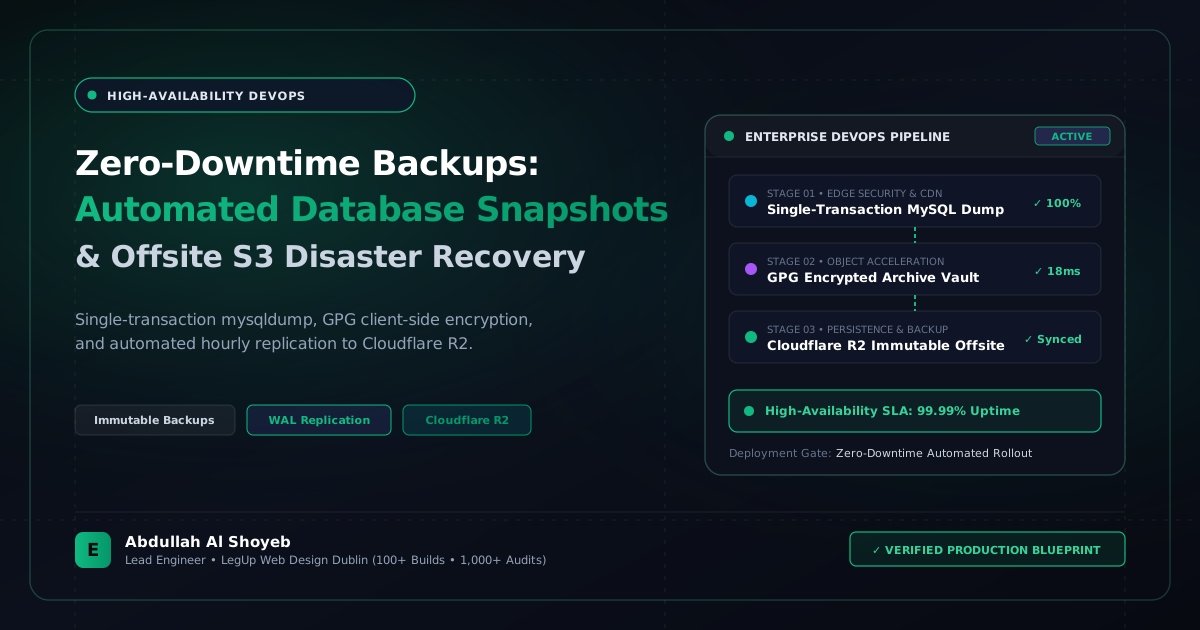
At EOSITE, we implement an enterprise-grade offsite disaster recovery pipeline executed entirely at the Linux shell level, independent of WordPress execution, with automated offsite synchronization and Discord/Slack notification webhooks.
The Golden Rule: –single-transaction and –quick on InnoDB
WooCommerce orders, customer meta, and order items live in InnoDB tables. Using mysqldump with the --single-transaction flag starts a consistent snapshot at the storage engine level without locking write operations. Customers can continue completing checkouts while the dump is actively running:
# Production non-locking database dump
mysqldump --defaults-extra-file=/root/.my.cnf
  --single-transaction
  --quick
  --skip-lock-tables
  --triggers
  --routines
  client_wc_production | gzip -9 > /var/backups/eosite/db_backup_$(date +%Y%m%d_%H%M%S).sql.gz
Securing Customer Data: Symmetrical GPG Encryption Before Offsite Transfer
To remain strictly compliant with GDPR and PCI-DSS data protection guidelines, customer database dumps must never be transmitted or stored in unencrypted plaintext. We pipe the gzip stream through 256-bit AES GPG encryption:
# Encrypt backup archive with GPG passphrase or public key
gpg --batch --yes --passphrase-file /root/.backup_pass
  --symmetric --cipher-algo AES256
  -o /var/backups/eosite/backup_secure.sql.gz.gpg
  /var/backups/eosite/db_backup.sql.gz
Automating Offsite Storage with S3 Lifecycle Retention Rules
We push the encrypted payload to an AWS S3 or Backblaze B2 bucket configured with lifecycle policies: daily backups retain for 14 days, weekly snapshots retain for 60 days, and month-end snapshots archive to S3 Glacier for 1 year:
# Sync to offsite encrypted bucket via AWS CLI
aws s3 cp /var/backups/eosite/backup_secure.sql.gz.gpg
  s3://eosite-client-offsite-backups/dublin-store/$(date +%Y)/$(date +%m)/
  --storage-class STANDARD_IA
Automated Failure Webhooks: Never Wonder If Backups Succeeded
A backup pipeline you never test or monitor is not a backup pipeline. We wrap our nightly bash script in a monitoring hook that pings an internal webhook upon both success and failure:
#!/usr/bin/env bash
set -eo pipefail

WEBHOOK_URL="https://discord.com/api/webhooks/12345/abcdef..."
SITE_NAME="Floppy Fabrics Production"

trap 'curl -s -H "Content-Type: application/json" -X POST -d "{"content":"🚨 BACKUP FAILED for  at $(date)"}" ""' ERR

# Run backup routine
bash /usr/local/bin/eosite-backup-run.sh

# If successful, ping heartbeat
curl -s -H "Content-Type: application/json" -X POST
  -d "{"content":"✅ Nightly backup verified and offloaded for  (Database size: $(du -sh /var/backups/latest.sql.gz | cut -f1))"}"
  ""
This automated protocol guarantees recovery point objectives (RPO) under 24 hours and recovery time objectives (RTO) under 15 minutes in any server catastrophe scenario.
Frequently Asked Questions: Architectural Insights
Why are standard daily WordPress backups inadequate for active WooCommerce stores?
If an active store taking 50 orders an hour restores a 24-hour-old database backup, all customer transactions, order updates, stock deductions, and account creations from that day are permanently erased. Active stores require near-real-time WAL (write-ahead log) replication or hourly incremental snapshots.
What is the safest offsite storage location for automated WordPress backups?
S3-compatible immutable storage such as Cloudflare R2 or AWS S3 with Object Lock enabled. This guarantees backups cannot be deleted or encrypted by ransomware even if server credentials are compromised.
Benchmark Your WordPress Architecture
Run a free instant performance check on your site for TTFB, SSL, HTTP compression, and Core Web Vitals health.