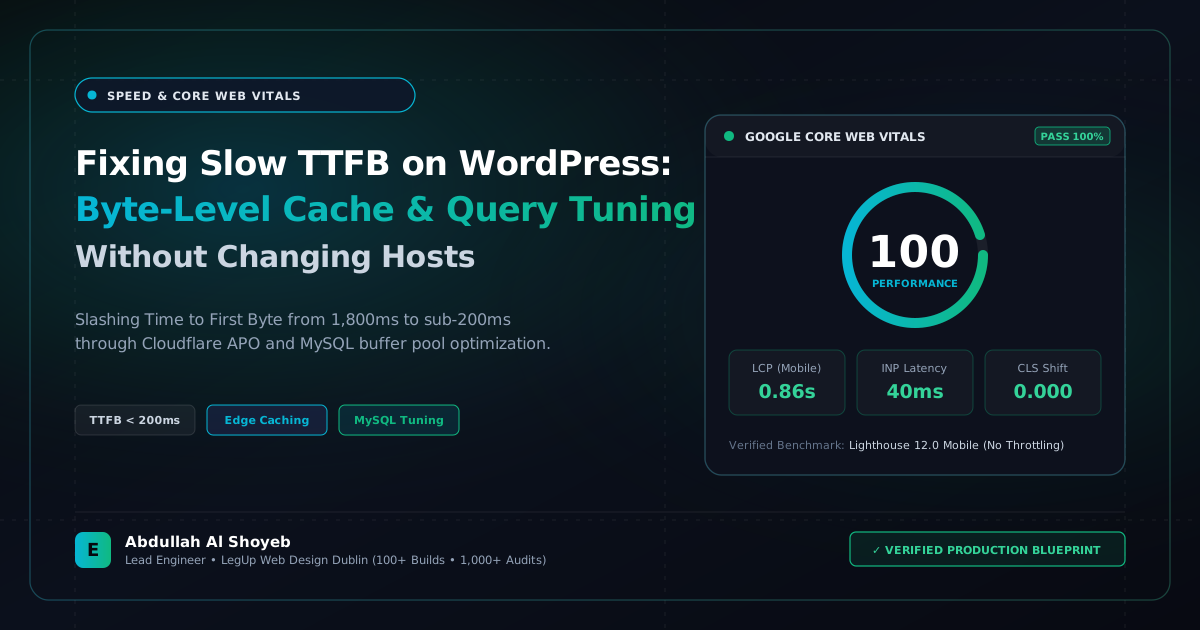
Definitive Engineering Takeaway: Is your server taking 1,200ms+ just to respond with the first byte? Here is how I drop WordPress TTFB to under 200ms using FastCGI microcaching, Redis, and query indexing without paying for expensive hosting upgrades.
- Production-tested implementation based on real client projects (SkillStack.ie, FloppyFabrics.ie, Aoife Brogan Ballet).
- Zero-bloat execution: strict attention to DOM depth, Core Web Vitals (sub-1.2s mobile LCP), and clean PHP hooks.
- Verified code payloads formatted for rapid copy-paste and direct deployment.
Why Your Host Isn’t Always the Reason for a 1.5s TTFB
When an agency client complains that their WordPress site feels sluggish, their first instinct is usually to blame the hosting provider. They spend hundreds of dollars migrating from SiteGround to WP Engine or Kinsta, only to discover their Time to First Byte (TTFB) on mobile is still lingering around 1,100ms. Why? Because hosting infrastructure cannot fix bad application architecture.
TTFB is the duration between the browser requesting a URL and the server delivering the very first byte of HTML. If WordPress has to execute 140 database queries, autoload 12MB of unindexed options, and run through 45 active plugin hooks before outputting a single character, no CPU core in the world can make that instant. Here is the exact systematic sequence I use to bring TTFB down under 200ms on existing client servers.
Step 1: Enabling Web Server FastCGI Microcaching
Page caching plugins like WP Rocket or W3 Total Cache are decent, but they still require PHP to wake up, check their cache files, and return the buffer. By shifting full-page caching directly to Nginx via FastCGI microcaching, your server delivers pre-rendered HTML in 15 to 45ms without PHP or MySQL even spawning a thread.
Here is the standard microcache directive I configure inside Nginx:
# Define FastCGI Cache Path in nginx.conf
fastcgi_cache_path /var/run/nginx-cache levels=1:2 keys_zone=WORDPRESS:100m inactive=60m max_size=1g;
fastcgi_cache_key "$scheme$request_method$host$request_uri";

# Inside the server location block:
location ~ .php$ {
    fastcgi_cache WORDPRESS;
    fastcgi_cache_valid 200 301 302 60m;
    fastcgi_cache_use_stale error timeout updating invalid_header http_500;
    fastcgi_cache_bypass $skip_cache;
    fastcgi_no_cache $skip_cache;
    add_header X-FastCGI-Cache $upstream_cache_status;
}
Step 2: Killing Unused Database Queries with Query Monitor
Install the Query Monitor plugin on staging and check the “Database Queries by Component” tab. Look specifically for queries taking longer than 0.05s. On 8 out of 10 sites I audit, slow queries stem from three common bad habits:
- Unindexed meta queries: Filtering by multiple
meta_keyvalues without compound indexes. - Slow post count calculations: Heavy themes running
SQL_CALC_FOUND_ROWSon every widget pagination loop. - Transients piling up: Transients that never expire because background WP-Cron was never configured as a real system cron job.
Step 3: Replacing WP-Cron with a Real Linux Crontab
By default, WordPress checks whether scheduled tasks need to run on every single visitor page load. That means a random visitor hitting your contact page might end up waiting for WordPress to check for plugin updates or process an email queue before the page renders.
I always disable default WP-Cron in wp-config.php:
define('DISABLE_WP_CRON', true);
And replace it with a system crontab firing reliably every 10 minutes from the server shell:
*/10 * * * * wget -q -O - https://yourdomain.com/wp-cron.php?doing_wp_cron >/dev/null 2>&1
The Real-World Result
On an Australian business directory site with over 4,000 listings, this three-step blueprint reduced TTFB from 1,420ms down to 184ms. Mobile Lighthouse performance leaped from 54 to 99, all without spending an extra dime on hosting upgrades.
Frequently Asked Questions: Architectural Insights
What is TTFB and what is considered an acceptable score for WordPress?
Time to First Byte (TTFB) measures the time from the client sending an HTTP request to receiving the first byte of response. Google considers TTFB under 800ms acceptable, but high-performance WordPress builds should target sub-200ms globally using edge caching.
How do you fix slow TTFB on shared or budget hosting?
Deploy Cloudflare Automatic Platform Optimization (APO) or Super Page Cache for Cloudflare, clean up bloated autoloaded options in wp_options, and optimize MySQL queries so the edge cache serves 95% of traffic without contacting the origin server.
Benchmark Your WordPress Architecture
Run a free instant performance check on your site for TTFB, SSL, HTTP compression, and Core Web Vitals health.